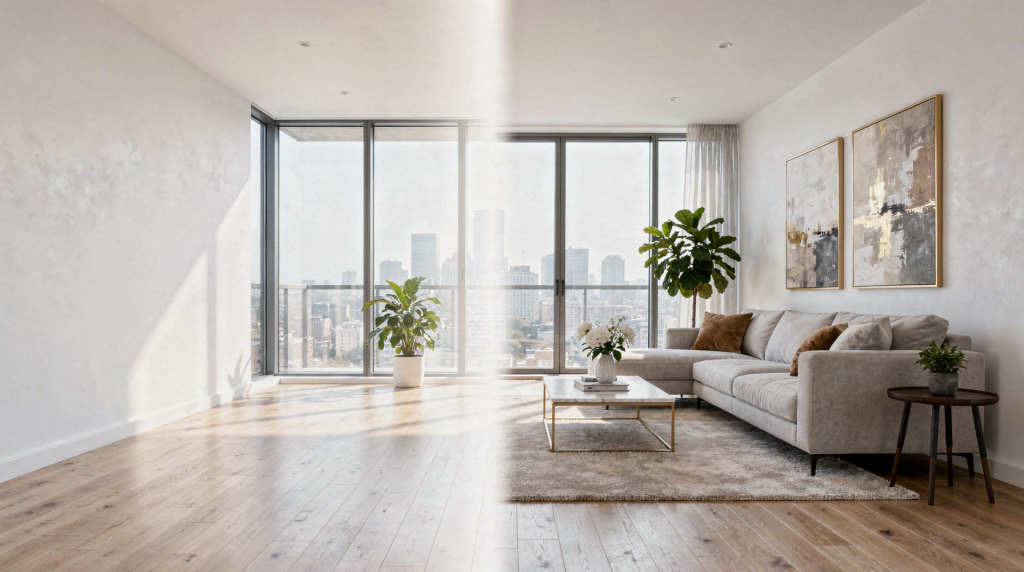
AI virtual staging has moved from a niche editing trick to a practical sales tool for real estate marketing. Used well, it helps empty or under-furnished spaces feel understandable, memorable, and easier to buy into — without the cost and logistics of physical staging.
For agents, photographers, and property marketers, the real opportunity is not just making rooms look prettier. It is about speeding up decisions, improving listing performance, and presenting a property in a way that is accurate, persuasive, and compliant.
What AI Virtual Staging Actually Is
AI virtual staging is the digital furnishing of a real room photo using software that adds furniture, décor, and styling elements. In most workflows, you start with an existing image of a vacant or sparsely furnished room, choose a style, and let the system generate a staged version.
In plain terms, it is virtual interior design for listing photos. The goal is not to deceive buyers, but to help them understand scale, layout, and lifestyle potential faster. When I first started filming empty apartments, the biggest hurdle was always conveying a sense of proportion. A wide-angle shot of a bare living room gives no clue whether a sectional sofa will fit or if the dining area feels cramped. AI staging solves that by inserting a visual anchor — a sofa, a table, a rug — that immediately grounds the space.
Why It Matters in Real Estate Marketing
Empty rooms are harder to read. Buyers often struggle to estimate how a space functions, where furniture might go, or whether the room feels inviting in real life. AI staging helps bridge that gap by turning a blank shell into a believable home environment.
It is especially useful when:
- a listing is vacant and feels cold in photos
- the property is new construction or recently renovated
- a room has awkward proportions and needs visual context
- physical staging is too expensive, too slow, or logistically impractical
- you want multiple design directions for the same space
AI staging also helps content teams move faster. Many tools can generate staged images in seconds or minutes, making them useful for same-day listing workflows and rapid A/B testing of visual styles. In video production, this speed translates directly to turnaround times for social media teasers and pre-listing campaigns. I’ve used it to create three different furnished looks for a loft in under an hour — something impossible with physical furniture.
How AI Virtual Staging Works
Most platforms follow a similar process:
- Upload a high-quality photo of the room.
- Select the room type, such as living room, bedroom, or dining area.
- Choose a style, such as modern, Scandinavian, classic, or luxury.
- Optionally remove existing furniture or clutter.
- Generate staged variations and pick the strongest version.
Some platforms are fully DIY and focused on speed, while others add human review or designer oversight for more consistent realism. The latter is worth considering if your brand demands a very specific aesthetic — say, a consistent luxury look across a portfolio of high-end listings.
The Best Results Usually Come From Better Source Photos
AI can only work with what the camera gives it. If the source image has poor lighting, heavy distortion, clutter, or a confusing angle, the staged result will usually look less believable.
Use images that are:
- sharp and properly exposed
- shot straight and level where possible
- free of major motion blur
- taken from a position that shows the full room
- minimally cluttered before staging
If a photo already looks amateurish, AI staging may improve the furniture, but it will not fix bad composition. In my experience filming interiors, I always lock the camera on a tripod, use a bubble level to keep vertical lines true, and avoid extreme wide-angle distortion. Those habits pay off when the image moves into an AI pipeline — the algorithms simply perform better on geometrically clean, well-lit frames.
AI Staging vs. Physical Staging
Both options solve the same problem, but they work differently.
| Factor | AI Virtual Staging | Physical Staging |
|---|---|---|
| Speed | Minutes or less in many tools | Days or weeks |
| Cost | Usually much lower per image | Significantly higher |
| Flexibility | Easy to test multiple styles | Limited by inventory and logistics |
| Realism | Strong, but depends on tool quality | Naturally real |
| Best for | Marketing visuals, vacant listings, style testing | High-end showings, luxury campaigns, open houses |
AI staging is usually the smarter first move when the goal is listing presentation, not in-person furnishing. Physical staging still wins when the property needs a fully immersive, real-world experience — especially for video walkthroughs where natural light plays across real textures and shadows. That said, I’ve started blending both: physical staging in key rooms for the video tour, and AI staging for supplementary stills of secondary spaces.
Where AI Staging Adds the Most Value
Vacant Listings
This is the clearest use case. Empty rooms often photograph well technically, but they rarely sell the feeling of a home. AI staging helps buyers see function and flow. I’ve shot countless vacant condos where the stills looked crisp but lifeless; adding a digital dining set and a rug transformed the same frame into a scene that felt lived-in.
Hard-to-Furnish Spaces
Odd layouts, bonus rooms, lofts, and small apartments can be difficult for buyers to interpret. A staged image gives context without misleading them about dimensions. For a recent loft with a slanted ceiling, AI staging showed a bed placement that made the awkward angle feel intentional rather than limiting.
New Construction
When a property is clean but visually sterile, AI staging helps the marketing look finished and aspirational. Builders often want to show potential before the model unit is furnished; AI lets them do that in days instead of weeks.
Pre-Listing Marketing
If the home is being prepared for market and the seller has already moved out, staged renders can support teaser campaigns, email previews, and social content before the listing goes live. I’ve used them to create short video slideshows with subtle Ken Burns moves — the digital furniture holds up surprisingly well in motion if the source image is sharp.
Multiple Buyer Personas
One of the most practical benefits of AI staging is style variation. The same room can be shown in multiple looks — minimalist, family-friendly, modern luxury, or warm transitional — to see what resonates best. This is especially powerful for A/B testing on listing portals or social ads.
The Biggest Mistake: Using AI to Misrepresent the Property
The line between helpful visualization and misleading advertising is still the most important issue in this category. Virtual staging is widely accepted, but it must be disclosed, and it should not hide defects or alter the actual property in a way that could mislead a buyer.
The core rule is simple:
- show buyers what the space can become
- do not make them think the staged furniture is physically present
- do not digitally hide damage, structural issues, or important visual realities
If you stage a room, the buyer should be able to tell that the image is digitally enhanced. In video, this becomes even more critical. A moving shot with AI furniture that doesn’t track perspective correctly can instantly break trust. I always recommend keeping at least one walkthrough clip that shows the actual, unstaged condition.
Disclosure: What Real Estate Teams Need to Know
Disclosure rules vary by market, MLS, and brokerage policy, but the direction is consistent: virtually staged images must be clearly labeled in a way buyers can see.
Common disclosure methods include:
- an on-image label such as “Virtually Staged”
- a caption or photo description field
- remarks in the listing copy
- a nearby note in the virtual tour or gallery
- a side-by-side original and staged version when required
A practical disclosure should answer three questions:
- What changed?
- Is the room currently furnished that way?
- Where can the buyer see the original condition?
A Simple Disclosure Workflow
- Keep the original image.
- Stage only with digital furniture and décor unless your rules allow more.
- Label the final image as virtually staged or digitally altered.
- Add disclosure in the listing remarks when required.
- Keep the original nearby if your MLS or platform rules call for it.
- Make sure the label still appears on portals, social posts, and ad creatives.
Quality Control: How to Judge Whether AI Staging Is Good Enough
Not every generated image is usable. A good staged photo should feel natural at first glance and only reveal its digital nature when inspected closely.
Check for:
- furniture scale that fits the room
- realistic shadows and light direction
- no floating objects or warped edges
- no furniture intersecting walls or windows
- believable spacing and walking paths
- consistent perspective across the room
Common AI Staging Errors
- sofas that are too large for the room
- rugs that look flattened or cut off
- lamps with awkward height or shape
- furniture legs that merge into the floor
- window reflections that do not match the room
- décor that repeats unnaturally across images
If these issues show up, the staged image can reduce trust instead of increasing it. In video, even a single frame with a floating chair leg can distract the viewer. I always scrub through generated stills at 100% zoom before they go into any edit.
What AI Virtual Staging Cannot Do Well
AI staging is useful, but it is not magic. It does not solve every visual problem.
It struggles when:
- the room is extremely dark
- the angle distorts the space heavily
- the room has complex architecture or mirrored surfaces
- the source image includes messy clutter that should have been removed first
- the output needs to match a very specific brand or luxury aesthetic
It also cannot replace honest photography of the actual condition. Buyers still need to know what they are walking into. For high-end video productions, I still rely on physical staging for hero shots because the interplay of natural light and real materials creates a depth that AI hasn’t yet mastered.
How to Use AI Staging Strategically in a Listing Workflow
The most effective teams do not use AI staging randomly. They treat it as one part of a larger presentation system.
Recommended Workflow
- Photograph the property cleanly.
- Select the rooms that benefit most from furnishing.
- Stage only the images that improve comprehension, not every photo.
- Keep at least one set of honest, unstaged images in the gallery.
- Use staged images in the primary positions where attention matters most.
- Disclose clearly and consistently across every channel.
This approach gives you the marketing advantage without creating a trust problem. When I produce a property video, I follow the same logic: the opening sequence might feature a beautifully staged still (with a subtle zoom or pan), but I always cut to a real footage segment that confirms the actual space.
Future Trends: Where Property Presentation Is Going
AI virtual staging is part of a broader shift toward faster, more adaptive visual marketing. The next stage is not just prettier listing photos — it is smarter property presentation.
1. More Personalized Styling
Instead of one generic staged look, marketing teams will generate multiple design directions for different buyer profiles: first-time buyers, downsizers, investors, or luxury clients. Imagine a 3D tour where the viewer can toggle between “young family” and “minimalist professional” furnishings in real time.
2. Faster Turnaround
The market is already moving toward near-instant generation, with many platforms emphasizing speed and batch processing. This will make same-day listing launches with fully staged galleries the norm, not the exception.
3. Better Integration with 3D and Interactive Media
AI staging will increasingly sit alongside 3D tours, floor plans, and immersive presentations rather than replacing them. I’m already testing workflows where a dollhouse view is populated with AI furniture that matches the stills, creating a consistent visual story across all assets.
4. Stronger Compliance Features
As use expands, tools will likely add more prominent disclosure support, audit trails, and MLS-friendly export options. This will reduce the risk of accidental non-compliance and make it easier for brokers to enforce policies.
5. More Editorial Control
The best systems will not just furnish a room automatically. They will let marketers control style, room type, and realism with much more precision — down to the fabric texture and lamp color. This level of control is essential for brands that need a signature look across hundreds of listings.
Practical Checklist for Agents and Photographers
Use this before publishing staged property images:
- Is the source photo well lit and level?
- Does the staged furniture fit the room logically?
- Are the shadows and perspective believable?
- Is the image clearly labeled as virtually staged?
- Does the disclosure appear in every place the image is used?
- Are original photos available if required?
- Does the staging enhance understanding without hiding issues?
When AI Virtual Staging Is the Right Choice
AI staging makes sense when you need:
- fast visual improvement
- lower-cost presentation than physical staging
- flexible style testing
- a better first impression for vacant or sparse rooms
- marketing assets for online listing channels
It is less useful when the property already shows well, when the room has serious visual defects, or when the marketing goal depends on a fully physical, luxury-level presentation. In those cases, the budget is usually better spent on a skilled photographer and a few key pieces of real furniture.
Final Thoughts
AI virtual staging is not replacing real estate photography, and it is not replacing good judgment. It is becoming a practical layer in the property presentation toolkit: faster than physical staging, cheaper to scale, and powerful when used honestly.
The teams that get the most value from it will be the ones that treat it as a communication tool, not a shortcut. The goal is simple: help buyers see the space clearly, imagine themselves in it, and trust what they are looking at.
FAQ
Is AI virtual staging legal?
Yes, virtual staging is broadly permitted, but disclosure rules vary by state, MLS, and brokerage policy. The key requirement is to label staged images clearly.
Does AI virtual staging need to be disclosed?
In most markets, yes. Buyers should be able to tell that furniture or décor has been digitally added, usually through an on-image label, caption, or listing remark.
Is AI staging better than physical staging?
It depends on the goal. AI staging is faster and cheaper, while physical staging gives buyers a real-world experience that digital staging cannot fully replace. For video tours, physical staging still creates a more authentic atmosphere.
What rooms benefit most from AI staging?
Living rooms, bedrooms, dining areas, and bonus spaces usually benefit the most, especially when they are vacant or under-furnished. These are the rooms where scale and function are hardest to read without furniture.
Can AI staging hide flaws in a property?
It should not. Good practice is to use virtual staging to add context, not to conceal defects or misrepresent the property. Hiding cracks, water stains, or awkward structural elements is both unethical and, in many jurisdictions, illegal.